This year, I decided to start publishing free and open-source software. It’s surprising that I haven’t released much during my programming career. All of my work has been done behind the scenes on startup projects. Well, this changes in 2026!
This article documents the creation of my file-sharing tool called File Transfer. You can try it online.
Inspiration
I encountered a pain point: file sharing. My family has gigabytes of childhood pictures and videos. I now live in a different country, and the internet is the most convenient way for me to get this personal data. Weirdly, I couldn’t find suitable online file transfer software that met my standards.
Sure, I could pay for a month of cloud storage, download the files, and unsubscribe. Despite the inconvenience, money is not the problem here. I prefer my data not to be stored on someone else’s computer.
Similar Projects
I’ve looked around online. Most file-sharing services require you to upload files to a server to receive a download link. They come bundled with registration requirements, long privacy policies, and closed-source “trust me bro” security. Furthermore, most such services impose limits on free use, as they incur storage and bandwidth costs for the service provider.
Other open-source peer-to-peer tools exist. I’ve tested a lot of them and was dissatisfied with the results. You can find a comparison table at the end of this article.
The Goal
Primary requirements for this project were:
- Minimal server infrastructure
- Solid encryption
- Streaming uploads/downloads
- Ability to transfer folders, not just files
I chose to build a WebRTC-based web application. The web is the most accessible medium and it comes with WebRTC, which provides reliable data transfer and built-in encryption. The connections established by this technology must use DTLS communication protocol. It is designed and implemented by experts, and I prefer to not roll my own encryption.
To transfer many files at once, I decided to zip the contents on the sender’s device and write them to a single file on the receiving end. I’ve tried many strategies to implement resumable downloads, but it simply isn’t possible in the browser. If the transfer fails, it must be restarted.
The final tech stack ended up with these open source projects:
- peer-lite for WebRTC connectivity
- streamsaver to save large files
- client-zip for file grouping
- Preact for the frontend
- Golang for the signaling server
- Playwright for end-to-end testing
A Quick Tutorial
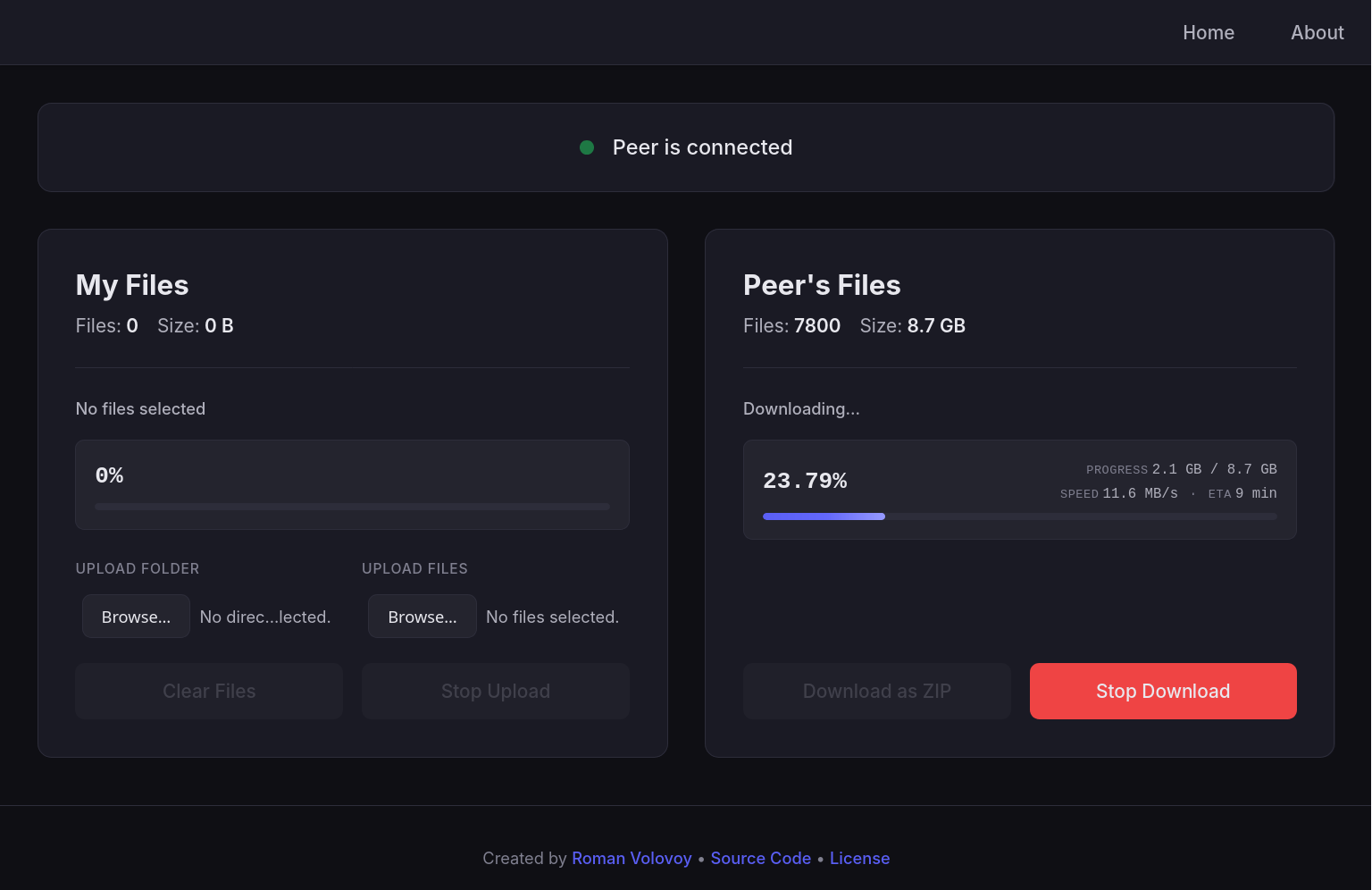
Go to the app, create a room, and share the link on the screen with someone. Next, both participants can select files or folders to transfer. When ready, click “Download as ZIP”, choose where to save the archive, and wait for the download to complete.
How it Works
On the technical side, this project has a privacy-oriented architecture.
It starts with the share link. It’s made up of 2 unique ids: roomId and secret. These IDs are generated locally by the room creator and are hidden from the server using the hash of the url.
Example share link:
https://file-transfer.free-app.net/room#zt548mA5ME_avMX6Ferv;kazvXZ8th5g7WPj_j1ZiUtilizing client-generated IDs simplifies server implementation. To connect, your browser listens on roomId for messages while sending encrypted signaling data. The server has no database as it simply relays messages via a map of Go channels.
This signaling information could reveal network topology, so an extra layer of encryption was added. I used subtle crypto with AES-GCM mode, with a key derived from the SHA-256 hash of the secret.
Once the connection is established, browsers communicate over an ordered, reliable RTCDataChannel. Data is sent in 65KB chunks with 1MB of backpressure.
No metadata is leaked, as all file-related operations are done peer-to-peer.
The Fun Parts
Building decentralized apps in the browser comes with some “fun” challenges.
Programmatic File Acesss
The project went over my estimated development time due to the browser’s “security” features. So much effort is put into preventing proper file handling, which limits what web apps can do. Sure, I understand not allowing arbitrary file reading. But I cannot understand why the web page cannot control writing to a file after the user has clearly given intent to save it.
WebRTC API Sucks
It was not meant to be used directly. Don’t roll your own WebRTC implementation; use a library instead. The WebRTC API is surprisingly undocumented and very confusing. It is unclear which functions throw errors, why they do it, and if programmatic reconnection is required.
The WebRTC libraries aren’t good either. Many of them were built for JavaScript a decade ago and have an ancient, clunky callback API. Few implementations expose backpressure controls.
The only library I can recommend is peer-lite. It’s not feature bloated, modern, and just works! Its support for data channels is limited, and I had to create a simple abstraction layer.
Selecting Folders and Files
It is not possible. Wait, what? An input can be either “files” or “folder”. You can’t have both. And choosing a folder programmatically is Baseline 2025 newly available. It only took about 30 years to standardize folder inputs on the web.
Streaming Downloads
This was a doozy. I am using StreamSaver.js to handle this. The library uses really dirty hacks to allow writing to a file programmatically. Basically, it MITM the browser via an iframe, installs a web worker there, and sends the file chunks via MessageChannel.
The File System API is a new standard that will probably never see cross-browser support: showDirectoryPicker only works in Chromium. Apple surely would not want random websites accessing files on device. The term “file” is an abstract concept for Apple, anyway.
Playwright Issues
End-to-end testing was problematic. The tests pass in UI mode on chromium, firefox, and webkit. However, in headless mode, Chromium refuses to establish WebRTC connectivity. WebKit sometimes does the same, too. End-to-end tests are currently excluded from the CI.
Vibes?
Certainly! I used AI to generate a clean interface for this project, scaffold the “About” section, and set up a CI/CD workflow. Claude’s Sonnet 4.5 has turned my unstyled UI into quite a nice one! In total, it cost $4.6 and burned 7.8 million tokens. I’ve used agent mode in the Zed code editor, and it was a cool experience to watch the AI style my application in real-time.
Similar Project Comparison
| Service | Works | Folder Upload | Streaming | No Database | No Trackers or Ads |
|---|---|---|---|---|---|
| instant.io | ❌ | ❌ | ✅ | ✅ | ✅ |
| burritoshare.com | ❌ | ✅ | ❌ | ❌ | ❌ |
| toffeeshare.com | ✅ | ❌ | ✅ | ✅ | ❌ |
| pairdrop.net | ✅ | ❌ | ❌ | ✅ | ✅ |
| zetashare.com | ✅ | ❌ | ✅ | ❌ | ❌ |
| fileveda.com | ❌ | ❌ | ❌ | ❌ | ❌ |
| file-transfer.free-app.net | ✅ | ✅ | ✅ | ✅ | ✅ |
Conclusion
Peer-to-peer in the browser is hard. Security and web standards are the enemy. The only way to do actual serverless communication is with WebRTC, a funky low-level API.
After many iterations, the application works really well. Give it a try